Blog
September 22, 2026
Best Semantic Model Automation Tools for Enterprises

Blair Bader
Discover the best semantic model automation tools for enterprises, including Solid, dbt Labs, Cube, AtScale, Omni, and Databricks Genie.
For years, enterprise data teams have focused on building semantic layers one model at a time. Manual definitions, hand-coded metrics, and months of validation work occupied entire sprints. As organizations move from isolated BI projects to enterprise-wide AI initiatives, a different challenge is emerging: how do you automate the creation, testing, and maintenance of semantic models at scale?
Solid Data gives enterprise analytics teams a faster path to production-ready semantic model automation, reducing manual effort by 90% or more while maintaining governance across complex data domains.
This article compares the platforms that are shaping this space, with clear criteria around text-to-SQL reliability, BI integration depth, metric standardization, and multi-domain scalability.
Quick guide: 6 best semantic model automation tools for enterprise analytics
- Solid Data: The best end-to-end platform for automated semantic model generation, testing, and enterprise-wide governance
- dbt Labs: Code-first metric definitions tied to your existing data pipeline
- Cube: API-driven semantic layer with pre-aggregation caching for analytical workloads
- AtScale: Virtual semantic layer connecting BI tools directly to cloud warehouses
- Omni: Shared data model built for self-service analytics and visualization
- Databricks Genie: Natural language querying embedded in the Databricks lakehouse environment
How we chose the best semantic model automation tools
Enterprise data teams face a specific set of pressures: fragmented data sources, hundreds of metrics that drift across tools, and growing demand for AI-ready data access. We evaluated platforms based on how well they address those realities at production scale.
- Automation depth: Can the platform auto-generate semantic models from existing schemas, or does every definition require manual work?
- Text-to-SQL accuracy: When business users ask questions in natural language, how reliably does the system produce correct SQL across multi-table joins?
- BI tool integration: Does the semantic layer connect natively to your existing dashboards and reporting tools without requiring migration?
- Multi-domain coverage: Can the platform handle semantic models across different business units, geographies, and data domains simultaneously?
- Governance and validation: Are there built-in mechanisms for testing, versioning, and certifying semantic models before they reach production?
- Scalability: How does the platform perform when managing thousands of tables and hundreds of semantic models?
The 6 best semantic model automation tools for enterprise analytics
1. Solid Data: Best overall semantic model automation platform
Solid Data automates the entire lifecycle of semantic model generation, from initial discovery through ongoing maintenance. Where other tools require teams to hand-code every metric definition, Solid Build auto-generates semantic models from existing BI schemas and data warehouse structures, reducing what typically takes months to a matter of days.
The platform's text-to-SQL engine, Solid Analyze, runs queries against a curated context layer rather than raw schemas. This approach delivers 85%+ accuracy on enterprise data, compared to 20-30% accuracy that data teams typically see from unstructured AI querying.
For organizations managing data across multiple business units and regulatory environments, Solid operates across complex data domains without requiring separate implementations for each. Financial institutions and retail enterprises use Solid to maintain consistent definitions across departments while keeping governance intact.
Solid Data features
- Automated semantic model generation: Creates tables, metrics, relationships, and SQL definitions based on actual data usage patterns, saving your team months of manual modeling
- Built-in validation and testing: Test and certify models directly in the platform before deploying to production, giving data engineers full control over quality
- Enterprise text-to-SQL engine: Generates trusted SQL using a governed context layer, so business users get accurate answers without analyst intervention
- Multi-platform export: Deploys semantic models to Snowflake Cortex, ChatGPT, dbt, and other AI and BI tools from a single source
- AI-powered data discovery: Solid Build automatically finds, describes, and organizes your enterprise data assets
- Production monitoring: Track SQL accuracy, user queries, and model performance across AI tools in real time
Solid Data pros and cons
Pros:
- Reduces semantic modeling effort by 90-95%, freeing data teams for higher-value analysis work
- Text-to-SQL accuracy benchmarked 25% higher than competing engines on real customer data
- Connects to existing data infrastructure without requiring migration or tool replacement
Cons:
- Focused on enterprise-scale use cases, so smaller teams may not need the full platform
- Deepest value comes from organizations with complex, multi-domain data environments
- Newer entrant in the market compared to some established semantic layer vendors
2. dbt Labs: Code-first metric definitions for pipeline-focused teams
dbt Labs extends its data modeling framework with a semantic layer that lets teams define metrics in code alongside their existing dbt models. If your analytics engineering workflow already runs on dbt, the semantic layer integrates into that pipeline without adding a separate tool.
The platform uses MetricFlow to standardize metric definitions and make them queryable through connected BI tools. This works for teams that want version-controlled metric logic managed through pull requests and CI/CD processes.
dbt Labs features
- MetricFlow engine: Defines metrics as code, making definitions versionable and testable through standard engineering workflows
- Git-native governance: Metric changes follow pull request review processes, creating an audit trail for every definition change
- BI tool connectors: Connects to Tableau, Looker, and other visualization platforms through published APIs
dbt Labs pros and cons
Pros:
- Fits naturally into existing dbt data pipelines without adding new tooling
- Version control through Git gives teams full change history on metric definitions
- Active open-source community contributes packages and shared patterns
Cons:
- Semantic layer is limited to data already modeled inside dbt, not data across the full enterprise
- Requires SQL and YAML proficiency, which limits adoption among non-technical business users
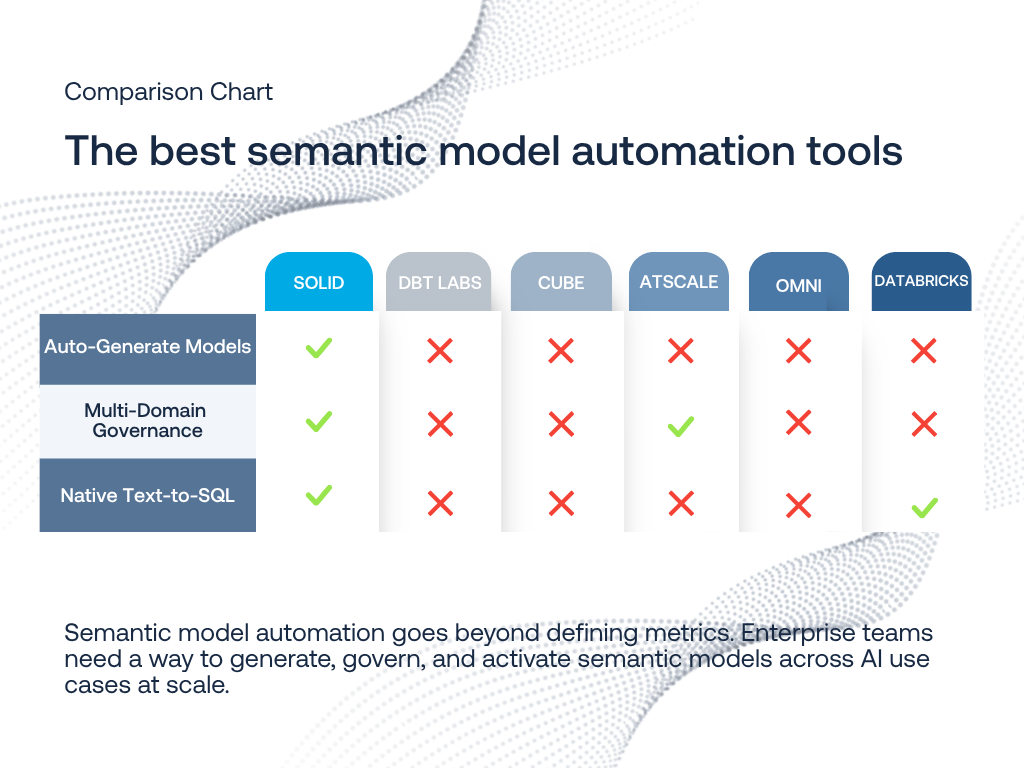
- Auto-generation of semantic models is not a native capability; definitions must be manually authored
3. Cube: API-driven semantic layer with pre-aggregation caching
Cube positions itself as an API-first semantic layer, allowing developers to define metrics that get served through REST and GraphQL endpoints. The platform includes pre-aggregation features that cache frequently accessed data combinations for faster query response times.
For teams building custom analytics applications or embedding analytics into products, Cube's developer-oriented approach offers programmatic control over how metrics get exposed to downstream consumers.
Cube features
- Pre-aggregation engine: Caches common query patterns to reduce load on your data warehouse during peak usage
- Multi-API access: Exposes metrics through REST, GraphQL, and SQL APIs for flexible integration with custom applications
- DAX API connector: Connects natively to Power BI through a DAX interface for Microsoft-centric environments
Cube pros and cons
Pros:
- API-first architecture makes it a fit for teams building custom analytics applications
- Pre-aggregation reduces query costs on cloud data warehouses during high-concurrency periods
- Open-source core allows teams to inspect and modify the underlying logic
Cons:
- Requires developer resources to define and maintain metric schemas in YAML or JavaScript
- Does not auto-generate semantic models from existing warehouse schemas
- Enterprise governance features like model certification and testing require additional configuration
4. AtScale: Virtual semantic layer for BI-to-warehouse connectivity
AtScale creates a virtualization layer between BI tools and cloud data warehouses, allowing analysts to query warehouse data through familiar BI interfaces without needing to create extracts or OLAP cubes. The platform translates BI tool queries into optimized SQL against your warehouse.
Organizations already invested in tools like Excel, Tableau, or Power BI can connect them directly to cloud data through AtScale's universal semantic layer approach without changing analyst workflows.
AtScale features
- BI virtualization: Connects Excel, Tableau, and Power BI directly to Snowflake, Databricks, and BigQuery without data movement
- Autonomous optimization: Monitors query patterns and automatically creates aggregates to improve performance
- MDX and DAX support: Maintains compatibility with legacy BI tools that rely on multi-dimensional query languages
AtScale pros and cons
Pros:
- Preserves existing BI tool investments by acting as a translation layer to modern warehouses
- Query optimization happens automatically based on observed usage patterns
- Supports MDX queries, which is relevant for organizations migrating from legacy OLAP environments
Cons:
- Primarily focused on BI-to-warehouse connectivity rather than full semantic model automation
- Does not generate semantic models from scratch; teams must define structures manually
- Text-to-SQL and natural language querying are not core platform capabilities
5. Omni: Shared data model for self-service visualization
Omni combines a shared data modeling layer with self-service analytics capabilities. The platform lets data teams define a canonical model that business users can explore through a visual interface, reducing the gap between governed definitions and ad-hoc analysis.
Teams that want both a data model and a BI tool in a single product find Omni's combined approach useful for consolidating their analytics stack.
Omni features
- Shared data model: A single modeling layer that governs how all users interact with data across reports and dashboards
- Self-service exploration: Business users can build queries and visualizations on top of the governed model without writing SQL
- dbt semantic layer integration: Connects to dbt's MetricFlow definitions for teams using both platforms
Omni pros and cons
Pros:
- Combines data modeling and visualization in a single tool, reducing vendor count
- Shared model approach ensures consistency between analyst work and business user exploration
- Integrates with dbt for teams that want to maintain definitions in code
Cons:
- Designed as a BI platform with modeling capabilities, not a standalone semantic automation tool
- Does not auto-generate semantic models from existing schemas or usage patterns
- Multi-domain governance features are limited compared to platforms built specifically for enterprise-scale modeling
6. Databricks Genie: Natural language querying in the lakehouse
Databricks Genie allows users to ask questions in natural language against data stored in the Databricks lakehouse. The tool uses Unity Catalog metadata to understand table relationships and generate SQL responses to business questions.
For organizations already running their data operations on Databricks, Genie adds natural language access without introducing a separate platform or moving data to another system.
Databricks Genie features
- Natural language interface: Business users type questions and receive SQL-generated answers from lakehouse data
- Unity Catalog integration: Uses existing catalog metadata and access controls to govern what data is queryable
- Workspace embedding: Available directly in the Databricks workspace alongside notebooks and pipelines
Databricks Genie pros and cons
Pros:
- No additional infrastructure required for teams already running on Databricks
- Uses Unity Catalog permissions, so access controls are inherited from existing governance
- Allows non-technical users to query lakehouse data without writing SQL manually
Cons:
- Only works with data stored in Databricks; cannot query across external warehouses or BI tools
- Does not generate or maintain reusable semantic models that port to other platforms
- Natural language accuracy depends on the quality of catalog metadata, which requires manual curation
Comparison table: The best semantic model automation tools
How does semantic model automation affect text-to-SQL accuracy?
Text-to-SQL systems generate answers by translating natural language into database queries. The accuracy of those queries depends almost entirely on how well the system understands your data. Without a governed semantic model defining table relationships, metric calculations, and business rules, AI has to guess how data connects.
Automated semantic models address this by encoding business logic before questions get asked. When a text-to-SQL engine runs against a pre-built context layer, it generates SQL using approved definitions rather than inferring relationships from raw schemas. Solid Data benchmarks show this approach improves AI accuracy from 20-30% to 85%+ on enterprise data.
The difference becomes visible at scale. A single metric like "revenue" might have different definitions across regions, product lines, and reporting periods. Without automation handling that complexity, every natural language query carries risk of returning the wrong answer.
What should data leaders consider when evaluating semantic layer scalability?
Scalability in semantic modeling is not just about handling more data. As organizations add business units, regulatory requirements, and AI use cases, the number of semantic models grows fast. A platform that works for 10 models may not work for 500.
Key factors to evaluate include:
- How does the platform handle model maintenance as schemas change?
- Can definitions be reused across business units without creating duplicates?
- Does the governance layer scale with team size, or does it become a bottleneck?
According to MIT CISR research published in May 2026, organizations with well-developed data curation practices are more than three times as likely to be effective at implementing value-realizing data and AI initiatives. That finding reinforces why automated semantic layer management is becoming a critical investment.
Solid Data addresses this by automating model maintenance alongside initial generation. As your data warehouse evolves, Solid keeps semantic models updated and validated automatically, reducing the operational cost that typically grows in proportion to model count.
Why Solid Data is the best semantic model automation tool
The core challenge in enterprise semantic modeling has shifted. Creating the initial model is no longer the hardest part. Maintaining, testing, and evolving hundreds of models across changing data environments is where organizations get stuck.
Solid Data addresses this directly. The platform auto-generates semantic models from your existing data structures, validates them against real business questions, and keeps definitions consistent as your data changes. That combination of automation, validation, and ongoing maintenance is what separates Solid from tools that only solve one piece of the lifecycle.
For enterprise data teams managing complex, multi-domain analytics, Solid Data delivers the governance depth and AI-readiness that production environments demand. See how Solid works with your data and move from months of manual modeling to days of automated deployment.
FAQs about Best Semantic Model Automation Tools for Enterprises
What is semantic model automation?
Semantic model automation is the process of using software to automatically generate, test, and maintain the business logic layer that sits between raw data and analytics or AI tools. Solid Data automates this end-to-end, creating metric definitions, table relationships, and validated SQL from existing data warehouse structures.
How does semantic model automation improve BI integration?
Automated semantic models create a consistent definition layer that every BI tool reads from. This means Tableau, Power BI, and Looker all report the same numbers without manual reconciliation. Solid Data exports models to multiple platforms simultaneously, keeping your BI tools aligned with a single source of truth.
Can automated semantic models support text-to-SQL?
Yes. Text-to-SQL engines produce more accurate results when they query against a governed semantic layer rather than raw schemas. Solid Data's text-to-SQL engine generates SQL from a curated context layer, resulting in accurate queries that reflect real business definitions and metric calculations.
What industries benefit from semantic model automation?
Any industry with complex, multi-system data environments benefits, but financial services, healthcare, and retail see particular value. Solid Data works with organizations across these sectors to maintain consistent analytics definitions across regulatory boundaries and business units.
How long does it take to deploy automated semantic models?
Traditional manual semantic modeling can take 12-24 months for enterprise-scale deployments. Solid Data reduces this to weeks, generating production-ready models in days and maintaining them automatically as your data evolves. The platform connects to your existing infrastructure without requiring migration.
Other posts

.png)
.png)