Blog
October 15, 2026
How AI Agents Actually Access Enterprise Data (Without Making Things Up)

Allison Parlett
Marketing Associate
.png)
How do AI agents access enterprise data and deliver accurate answers? Learn how database connections, SQL queries, and business context work together to help prevent misleading results.
An AI agent can connect to the right database, generate SQL that runs without errors, and still give the wrong answer. That is the problem enterprises face when AI starts working with real business data.
But what actually happens between asking an AI agent a question and getting an answer?
A simple request can involve several steps behind the scenes. The agent may need to find the right data, understand how records connect, generate a query, and retrieve information from an authorized source.
An agent might select an outdated table, count the same transaction twice, or overlook a refund. The result may look reasonable, but it doesn't necessarily reflect how the company measures its business.
How AI Agents Actually Access Enterprise Data
AI agents don't automatically know what's inside a company's databases. They need tools and connections that allow them to retrieve information from systems they're authorized to use.
Depending on the application, those connections may include:
- APIs: Allow applications to request information from other systems.
- Database connections: Provide access to structured data through configured permissions.
- Data warehouse integrations: Connect applications to platforms such as Snowflake or Databricks.
- SQL generation tools: Help translate questions into database queries.
A sales leader might ask an agent:
"Which customers increased their spending over the last six months?"
To answer, the agent needs to identify relevant customer and transaction records, calculate spending over two periods, and compare the results.
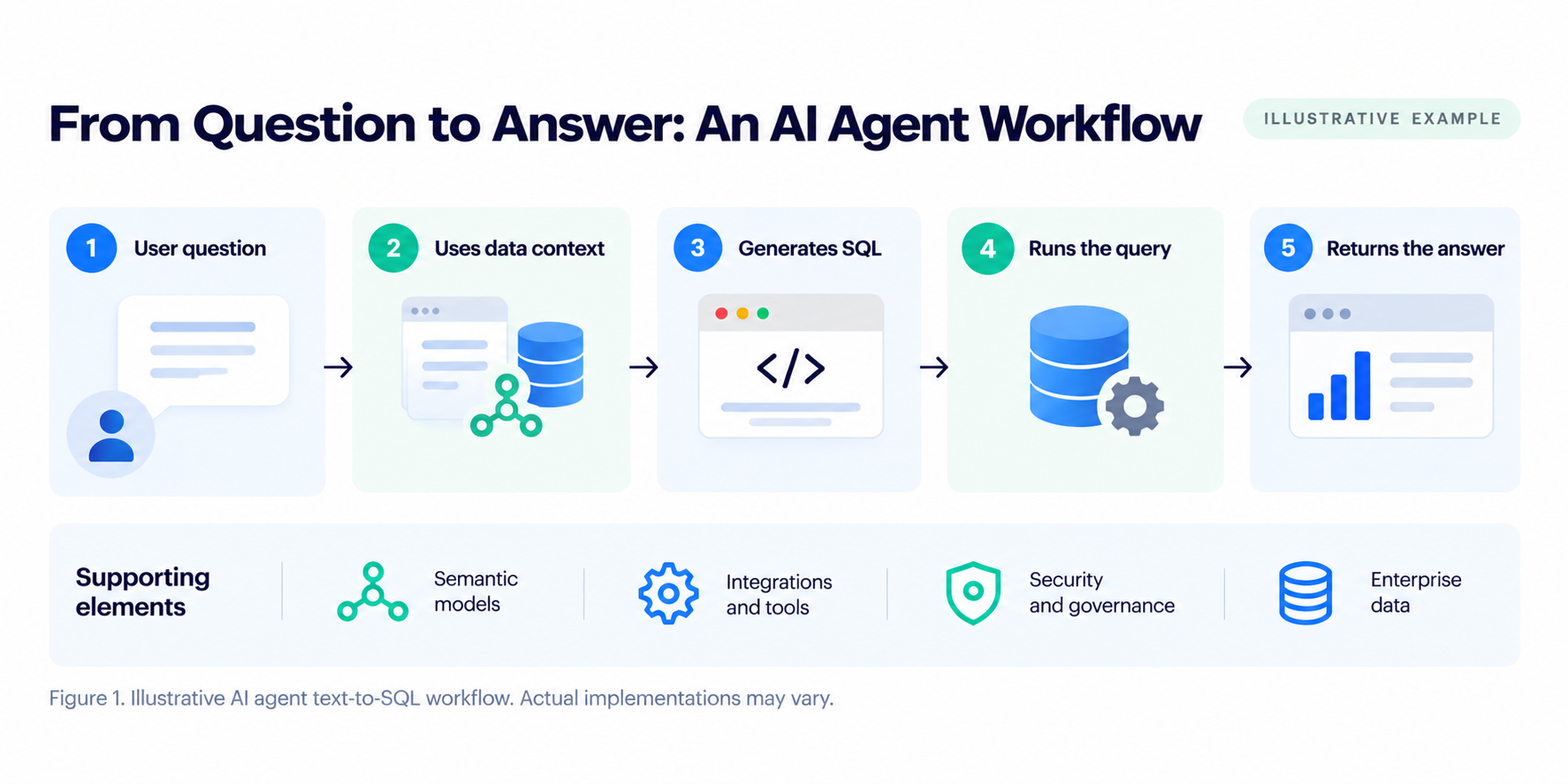
For AI agents that generate SQL, the process generally involves five steps:
- Understand the question: Identify what the user needs.
- Find the data: Locate relevant information and definitions.
- Generate SQL: Build a query using available context.
- Run the query: Retrieve data through an authorized connection.
- Return an answer: Present the results.
Not every AI agent follows this exact process. Some use predefined queries or other tools instead of generating SQL directly.
What Happens When an AI Agent Generates SQL?
SQL is the language commonly used to retrieve and calculate information stored in databases and data warehouses.
When an AI agent generates SQL, it needs to determine which tables contain the requested information and how those tables should be used.
An experienced analyst may already know which transactions should be excluded or how the company calculates customer spending. An agent needs access to that information.
Consider a company with separate tables for customers, orders, invoices, and payments.
If someone asks for total customer spending, should the agent use completed orders, invoices, or payments received? Should canceled orders and refunds be included?
Each choice can produce a different result.
If the agent selects the wrong records or combines tables incorrectly, the SQL might still run without errors. The database returns information, but the calculation may not reflect the company's reporting requirements.
Why Database Metadata Isn't Always Enough
Database metadata describes how information is stored, including table names, columns, data types, and relationships.
It's useful for navigating a database, but it doesn't always explain how the organization uses the information.
A column named order_amount may contain transactions that were later canceled or refunded. The database shows where the amount is stored, but it may not explain which transactions count toward completed sales.
To generate a query that reflects the company's reporting requirements, an agent may also need:
- Metric definitions: How revenue, spending, and other measures are calculated.
- Relationships: How customers, accounts, and transactions connect.
- Filters: Which records should be included or excluded.
- Reporting periods: Which dates apply to a calculation.
- SQL examples: Queries that demonstrate established reporting logic.
This additional information helps an agent determine how the data should be queried, not just where it's stored. This is also why context engineering matters when connecting AI applications to enterprise data.
How Semantic Models Help AI Agents Work With Data
Companies can provide agents with database documentation, predefined queries, or specialized tools. Another approach is to use a semantic model.
A semantic model organizes the definitions, calculations, and relationships used to interpret enterprise data.
This is part of semantic engineering, which focuses on creating and maintaining the business definitions that applications use to understand company data.
Instead of requiring each application to work out how raw database tables should be queried, the model provides a structured reference.
A company might define completed purchases using specific transaction statuses, dates, and exclusions. An agent using the semantic model can reference those rules when generating SQL.
This can reduce the amount of reporting logic the agent needs to determine independently.
It also gives data teams a way to review and manage the definitions used by multiple applications.
At enterprise scale, several AI agents, dashboards, and applications may access the same company data. Without shared definitions, one system might count trial accounts as customers while another excludes them. A common semantic model helps these systems follow the same business rules, reducing inconsistent answers across teams.
Why Testing Generated SQL Matters
A semantic model provides useful information, but it doesn't guarantee that every generated query will be correct.
Relationships may be incomplete, calculations may need additional conditions, or the underlying data may have changed.
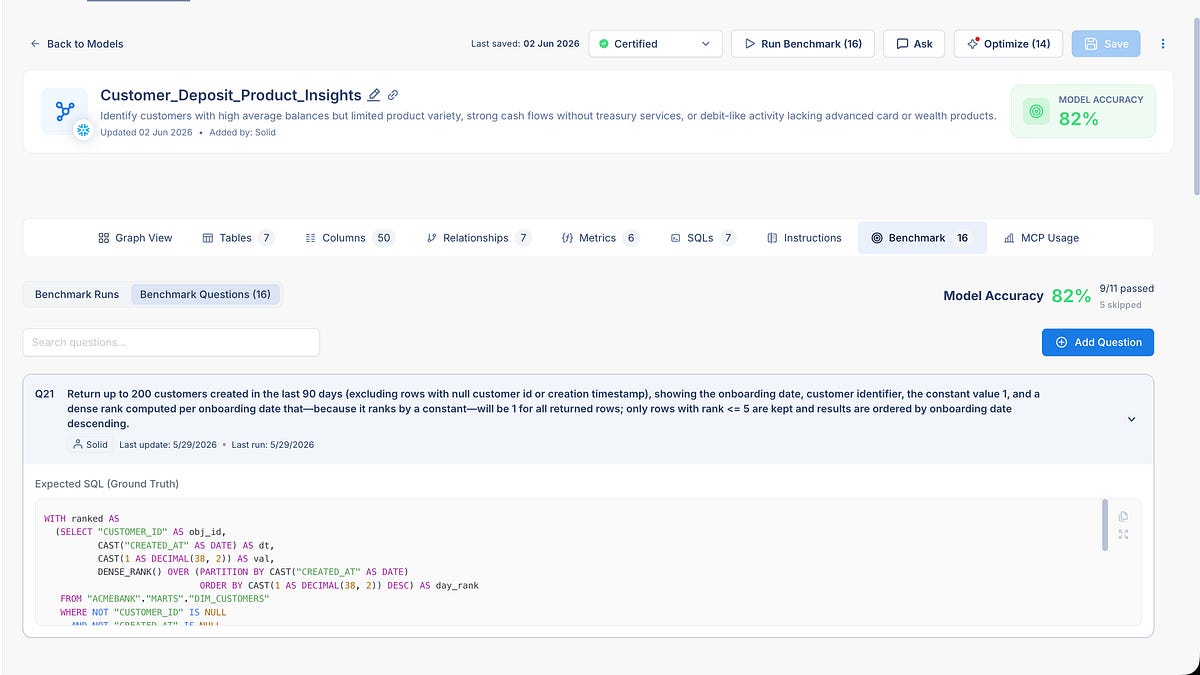
One way to evaluate generated SQL is to compare it with a known, approved query.
A data team may already have an approved SQL query for calculating customer spending. They can use that query as a reference when testing whether an AI-generated version produces the expected result.
If the results differ, the team can investigate the query, model definitions, and underlying data to understand why.
Testing doesn't eliminate every possible error, but it gives teams a repeatable process for identifying problems before relying on the results.
How AI Agents Connect to External Data Tools
As companies introduce more AI agents, they're also looking for ways to connect them to existing applications and data systems.
The Model Context Protocol (MCP) is an open protocol that allows compatible AI applications to communicate with external tools and information sources through a common interface.
For enterprise data workflows, an MCP server can expose tools that help agents retrieve information or request SQL.
An agent could use a connected tool to request a query based on available semantic model definitions.
However, generating SQL and executing it are separate steps. Query execution still requires an appropriate data connection and permissions.
MCP provides a way for systems to communicate. It doesn't automatically guarantee that the information returned will be accurate or that access is appropriately configured.
What About Privacy and Security?
Connecting AI agents to enterprise systems requires careful consideration of what information they can access and which actions they're allowed to perform.
This is especially important when systems contain customer information, financial records, or other sensitive data.
Depending on the application, safeguards may include:
- Access controls: Limit data access to authorized users and services.
- Least-privilege permissions: Provide only the access needed for the task.
- Query restrictions: Limit the database operations an agent can perform.
- Sensitive data protection: Apply appropriate controls to confidential information.
- Monitoring: Record relevant tool activity and database operations.
- Human oversight: Require approval for sensitive or consequential actions.
These protections depend on how the organization's systems and connections are configured.
Semantic models help applications interpret data, but they don't replace security controls or privacy requirements.
Why This Matters as AI Agents Become More Capable
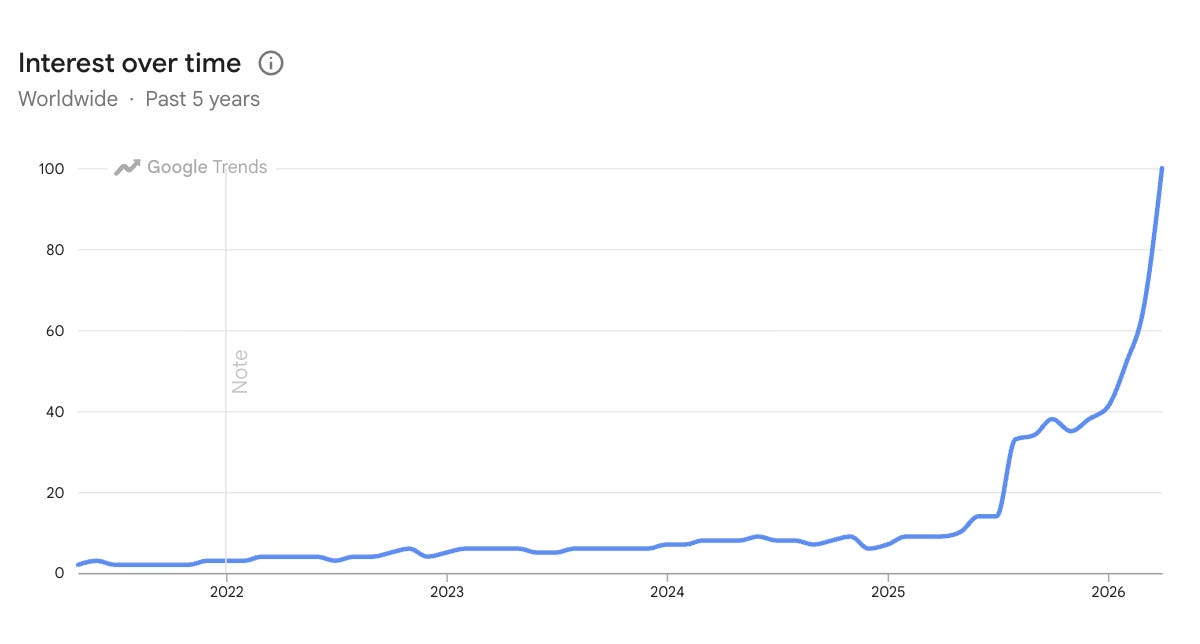
The growing use of AI agents is putting more attention on how enterprise data is prepared, accessed, and evaluated.
In May 2026, Gartner identified the lack of semantics as a concern for organizations deploying AI agents. Its research highlighted how missing definitions and relationships can contribute to inaccurate results and wasted spending.
Gartner also forecast that organizations prioritizing semantics in AI-ready data could improve agent accuracy by up to 80% and reduce costs by up to 60% by 2027.
These are forecasts, not guaranteed outcomes.
This also highlights why enterprise AI architecture matters. As more AI agents and applications use company data, organizations need consistent business definitions and rules to help ensure reliable results across systems.
As AI agents take on more responsibilities, inaccurate data can affect more than a single report. It can influence recommendations, customer decisions, and business operations.
For enterprises, the goal isn't just to make AI agents capable of completing tasks. It's making sure their results can be checked and their access to company data is properly controlled.
How Solid Supports Enterprise Data Workflows
Building semantic models can involve significant manual work, especially when companies have large data warehouses, established reporting processes, and multiple applications using the same information.
Data teams need to understand how tables connect, which calculations are used, and how reporting requirements change over time.
Solid automates the generation, testing, validation, and ongoing maintenance of semantic models using information from existing data environments. This reduces the manual work involved in creating and managing business definitions, especially as data and reporting requirements change.
Solid's automation capabilities include:
- Semantic model generation: Uses existing database metadata and SQL history to generate semantic models.
- Business context: Identifies relevant tables, relationships, metrics, and terminology.
- Model testing: Supports testing generated models against known questions and SQL examples.
- Validation: Helps teams check whether generated models reflect expected business definitions and results.
- Ongoing maintenance: Supports updates to semantic models as data structures and reporting requirements change.
Building and Maintaining Semantic Models
Solid Build automates the creation of semantic models using existing database metadata and SQL history. Rather than building everything manually, data teams can start with generated models that identify relevant tables, relationships, and metrics.
Teams can then review and refine those models to make sure they reflect how the business actually uses its data.
A generated model may identify a relationship between two tables, but the data team still needs to confirm that it accurately reflects how the organization uses those records.
As databases and reporting requirements change, models may need to be updated to reflect those changes.
Supporting SQL Generation for AI Applications
Solid Analyze is designed to generate SQL from natural language questions using semantic model information.
Through supported integrations, compatible applications can use that information when constructing queries.
When an application asks about customer spending, it could reference model definitions to help determine the relevant calculations and relationships.
The generated SQL can then be evaluated and executed through an appropriately authorized connection.
This approach allows data teams to make established definitions available to applications that generate SQL, while continuing to review how those definitions are used.
How This Could Work in Practice
A software company wants to develop an internal AI assistant that helps its customer success team identify accounts with declining product usage.
Its data warehouse contains account records, subscription information, product events, and user activity. The challenge is determining which activities count toward engagement and how individual users connect to customer accounts.
A simple count of logins may not reflect how the company measures meaningful product usage.
To support this workflow, the data team could:
- Identify the data: Determine which account and product activity tables are relevant.
- Define the metrics: Establish how product usage and declining activity should be calculated.
- Generate a semantic model: Use Solid Build to generate a model from available database information and SQL history, then review the relationships and calculations.
- Test the model: Compare generated queries with approved SQL and expected results.
- Connect the application: Make the necessary tools available through an authorized integration.
When a customer success manager asks which accounts have declining product usage, the AI assistant could use the semantic model to identify accounts that may need attention.
Instead of manually pulling reports from different systems, the team could see which customers are becoming less active, investigate potential issues, and follow up before those accounts are at greater risk of leaving.
Keeping AI Agents Useful as Data Changes
Enterprise data is constantly changing. Tables get updated, reporting rules change, and new data sources are introduced.
These changes can affect how AI agents retrieve and interpret information.
Solid supports ongoing semantic model maintenance as data structures and business requirements change, helping reduce the manual work needed to keep definitions current.
This helps organizations maintain consistent reporting as more AI applications rely on the same data.
Making Enterprise Data Useful for AI Agents
Connecting AI agents to enterprise data is only the first step. Even when a query runs successfully, the answer can still be wrong if it doesn't follow the company's business rules.
Semantic models help AI agents work with consistent definitions, while automation helps teams keep those models accurate as data and business needs change.
As more companies use AI agents across their operations, the challenge isn't just giving them access to data. It's giving them trusted business context that stays accurate as data and business needs change.
See how Solid helps enterprises build and maintain trusted business context for AI →
Frequently Asked Questions About AI Agents and Enterprise Data
How do AI agents access enterprise data?
AI agents access enterprise data through configured tools, APIs, database connections, and integrations. Depending on the application, they may retrieve information directly, use predefined queries, or generate SQL to answer questions.
How do AI agents generate SQL?
AI agents can use language models to translate questions into SQL. Database schemas, documentation, query examples, and semantic models can help determine which tables, relationships, and calculations to use.
Why can AI-generated SQL return incorrect results?
A query can execute successfully while using incorrect relationships, filters, or calculations. The database may return valid records, but the result can still differ from what the organization expects.
What is the role of semantic models in AI agents?
Semantic models represent definitions, metrics, calculations, and relationships that help compatible applications interpret structured enterprise data. They can support more consistent query generation but don't guarantee correct results.
How does MCP help AI agents access enterprise data?
MCP provides a standard way for compatible AI applications to communicate with external tools and information sources. It can support workflows for retrieving model information or requesting SQL.
Are AI agents safe to connect to enterprise databases?
Safety depends on how the tools, permissions, connections, and surrounding systems are configured. Organizations should apply appropriate access controls, protect sensitive information, and evaluate consequential actions.
How does Solid help AI agents work with enterprise data?
Solid helps enterprises automate the creation, testing, and maintenance of semantic models. Solid Build uses existing database information and SQL history to generate models, while Solid Analyze helps AI applications generate SQL using those business definitions and relationships.
This reduces manual work and helps AI agents use consistent business context when accessing enterprise data.
Sources
- Gartner. Gartner Says Lack of Semantics Causes Inaccurate AI Agents and Wasted Spending. May 11, 2026.
- Model Context Protocol. Official Documentation
Other posts

.png)